
How to Check Your Website's AI Readiness with a WebMCP Validator
August 27, 2026 · 7 min read
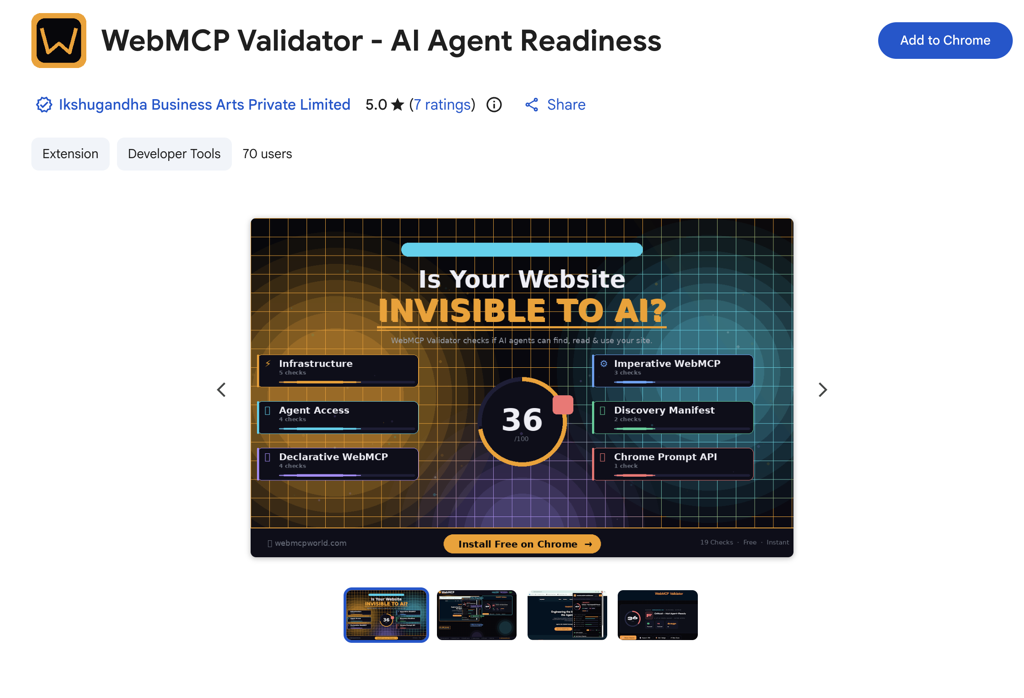
AI agents are starting to read and act on websites directly — not just crawl them for search. WebMCP is the emerging standard that lets a page expose structured tools an agent can call. A WebMCP validator scans your site and scores how ready it is for that world. This guide walks through running a scan, reading the result, and closing the gaps — using xNotePadAI's own audit (which we took from 48 to 99) as the worked example.
What "AI Readiness" Actually Means
Being AI-ready is broader than SEO. It's a mix of: agents being allowed in (robots, headers), being able to understand your site (structured data, a manifest), and being able to act on it (WebMCP tools). A validator bundles these into a single score so you can see where you stand at a glance.
Can agents reach it? HTTPS, 200 responses, robots.txt and headers that don't block AI crawlers.
Can agents understand it? llms.txt, structured data, and a /.well-known/webmcp discovery manifest.
Can agents act on it? Declarative WebMCP (annotated forms) and imperative WebMCP (JavaScript tools via document.modelContext).
Step 1 — Run the Scan
1. Install a WebMCP validator — either a hosted web tool or a Chrome extension (search the Chrome Web Store for "WebMCP Validator" / "AI Agent Readiness").
2. Enter your site's URL (or open the page and trigger the extension).
3. Scan the specific page you care about — validators check one page at a time, so scan the page where your tools and forms actually live (usually your homepage or app).
Watch the page you scan. Most validators are static scanners: they read the HTML the server sends, not the page after JavaScript runs. Scan the page that actually contains your forms and tool registration, and re-scan after you deploy changes — not before.
Step 2 — Read the Score
The report groups checks into categories. Here's what each block is really testing:
| Category | What it checks |
|---|---|
| Infrastructure | HTTPS, fast response, robots.txt, sitemap, 200 OK |
| Agent Access | AI crawlers not blocked, llms.txt present, no noindex |
| Discovery Manifest | A valid /.well-known/webmcp JSON file listing your tools |
| Declarative WebMCP | Real <form> elements annotated with toolname, tooldescription, toolaction |
| Imperative WebMCP | document.modelContext.registerTool() calls in the page |
Step 3 — Fix the Gaps (What We Did)
xNotePadAI's first scan came back at 48/100 (grade D). Here's the order we fixed things in, and roughly what each was worth:
1. Discovery manifest (+10)
Added a static /.well-known/webmcp JSON file listing all our tools with schemas and safety hints. The one check a static scanner can always verify.
2. Imperative tools (+8)
We register 5 tools on document.modelContext (and mirror to navigator.modelContext). Making the literal registerTool() call visible in the served HTML let the scanner detect it.
3. Declarative form (+28)
The biggest jump: a real, working note-search form annotated with toolname/tooldescription/toolaction. Not a decoy — it actually filters notes.
4. Human-in-the-loop consent (+4)
Write tools ask the browser to confirm with the user before acting.
Result: 99/100 (grade A+). The one point we left is the Chrome built-in AI (Gemini Nano) check — a separate on-device feature, not part of WebMCP.
📚 Dig Deeper
Common Reasons for a Low Score
✗ Scanned the wrong page
Your tools/forms are on one page; you scanned another.
✗ Changes not deployed
The validator reads live HTML — deploy first, then scan.
✗ Tools registered only at runtime
Static scanners can't run your JS — surface the API in the HTML.
✗ No real forms
Declarative checks need genuine <form> elements — don't fake them.
A note on honesty: chase the score by making your site genuinely more capable, not by tricking the scanner. A high AI-readiness grade should mean agents really can discover and use your site — a dead annotated form or a faked API string helps no one, and real agents won't be fooled.